
Disclosure: CSH does not currently have an affiliate relationship with Workiz. Links to Workiz go directly to workiz.com. Some other links on this page are affiliate links — if you sign up through one, I earn a small commission at no extra cost to you. My recommendations don’t change based on that.

Workiz Review (2026): Is It Worth It?
Purpose-built for dispatch-heavy field service teams who need route optimization, inventory tracking, and a free entry point — but the pricing gets complex fast once you start adding users and modules.
Workiz is purpose-built for dispatch-heavy field service teams that have outgrown basic scheduling tools. The dispatch board, route optimization, inventory management, and integrated phone system put it ahead of Jobber for operations that run 3–20 technicians across multiple service areas. And the permanently free Lite tier gives you a way to test the platform before spending anything.
The catch: pricing gets complicated. The advertised monthly rate is just the starting point. Per-user overage fees ($46–$65/month per extra user depending on tier), phone system add-ons, and feature gates between tiers mean your actual bill can land significantly higher than what you see on the pricing page. For a team that values straightforward pricing, that complexity is a real friction point.
Right for: Dispatch-heavy field service operations with 3–20 technicians (HVAC, plumbing, electrical, appliance repair, locksmith, junk removal) who need route optimization, inventory tracking, and integrated communication tools.
Not for: Solo operators who want the simplest possible tool (Jobber Core at $29 is cleaner), contractors who prioritize transparent pricing without surprises, or teams with more than 20 techs who may need enterprise-grade platforms like ServiceTitan.
What Workiz Gets Right
The free Lite tier is a genuine differentiator. Most Workiz competitors — Jobber, Housecall Pro, Service Fusion — only offer time-limited trials or no trial at all. Workiz offers a permanently free plan for up to 2 users with scheduling, mobile app access, online booking, and up to 20 jobs, invoices, and estimates per month. It is limited, but it lets a solo operator or a 2-person crew evaluate the core platform before committing a dollar.
That matters because field service software is not something you can evaluate from a demo. You need your technicians using it on real jobs for at least a few weeks before you know whether the mobile workflow works for your operation.
The dispatch board and route optimization are stronger than what Jobber offers. Workiz’s scheduling engine includes GPS-based location tracking, route planning that factors in technician proximity, and service area management. For operations dispatching 5–15 techs across a metro area, the route optimization alone can save meaningful drive time — and drive time is unbillable time. The visual dispatch board supports drag-and-drop scheduling with color-coded job statuses and real-time technician location updates.
Inventory and parts management is built in. This is a documented gap in Jobber that Workiz fills. Contractors running appliance repair, HVAC, or plumbing operations can track parts on the truck, manage stock levels, and tie parts costs to specific jobs. Inventory management is available on the Ultimate tier, with equipment tracking on Pro and above. For businesses where parts costs are a significant line item, having this inside the dispatch platform instead of in a separate spreadsheet is a real operational improvement.
The integrated phone system consolidates communication. Workiz includes built-in phone and SMS functionality starting from the Kickstart plan — a local number, call recording, and text messaging all inside the platform. Most competitors rely on third-party integrations for phone and text. Having calls, texts, and job records in one system means dispatchers can see the full communication history for every customer without switching between tools.
Multi-location and franchise support are native to the platform. Workiz supports franchise management, subcontractor coordination, and multi-location scheduling within the same account. For growing operations expanding to a second location or managing subcontractor crews, this avoids the need for separate accounts or workarounds. This is available on higher tiers (Ultimate for franchise management).
AI-powered features are being added aggressively. Genius Scheduling (AI-optimized technician assignment), Genius Leads (automated lead scoring), and an AI answering service are available on the Pro tier and above. These are newer features — not mature enough to base a purchasing decision on — but they indicate active product development. Workiz reports 32,000+ service professionals on the platform, which suggests enough scale to keep investing in the product.
Where Workiz Falls Short
Pricing complexity is Workiz’s most consistent complaint. The advertised tier prices ($225/month for Kickstart, $275 for Standard, $325 for Pro) are monthly rates that include a limited number of users. Each extra user beyond the included seats costs $46–$65/month depending on the plan and billing cycle. That adds up fast.
Here is what it looks like in practice. A 10-person team on the Standard plan ($275/month) with 5 included users needs 5 additional users at $55/month each = $275 extra. Total: $550/month. For the same 10-person team, Service Fusion’s Starter plan is $245/month for unlimited users. Pricing transparency matters, and Workiz’s structure requires more homework than it should.
The mobile app has documented stability issues. Workiz’s Google Play rating sits at 4.1/5 from 305 reviews — better than many competitors but still carrying consistent complaints. Users report the app freezing, requiring force-close and restart, occasional blank screens after reopening, and lag when navigating between jobs. One Google Play reviewer with 17 people finding their review helpful wrote: “Absolute trash. This app has done nothing but waste money and get frustrated. It fails to load even in perfect 5G on a brand new top of the line device. It crashes midway through processing payments.”
That is the extreme end, and the overall rating is reasonable. But multiple G2 reviewers (4.5/5 from 224 reviews) also note that “the mobile app can experience lag” and “the mobile application for field use often experiences disconnections on several occasions.” For a platform that positions itself as field-first, mobile reliability should be better.
Important features are locked behind higher tiers. Inventory management requires Ultimate. QuickBooks integration requires Standard. Custom reports require Pro. Automations are capped at 2 on Kickstart, 5 on Standard, 10 on Pro, and 30 on Ultimate. If you are evaluating Workiz, identify which features your operation actually needs and then price out the tier that includes them — not the tier that looks cheapest.
Customer support gets mixed reviews in 2025–2026. Multiple Capterra reviewers note difficulty reaching support and slow response times. One wrote: “Customer service is the absolute worst. They are constantly implementing new ‘features’ rather than improving the current flaws.” Another: “It’s OK, but it sucks having to always schedule a meeting with someone whenever you have issues.” G2 sentiment is more positive (“Customer service has been good. They’re responsive when I report bugs”), so experiences vary. But the pattern of complaints about support responsiveness appears across enough sources to flag.
The phone system adds cost on top of the base subscription. While Workiz includes a local number and basic phone functionality, per-minute calling and per-message SMS charges apply. Several G2 reviewers specifically called this out: “Pricing is my biggest concern. It’s expensive, and many new features come with additional costs. I don’t like that phone plans charge by the minute and per text message.” Budget for the phone costs separately from the tier price.
Pricing Breakdown
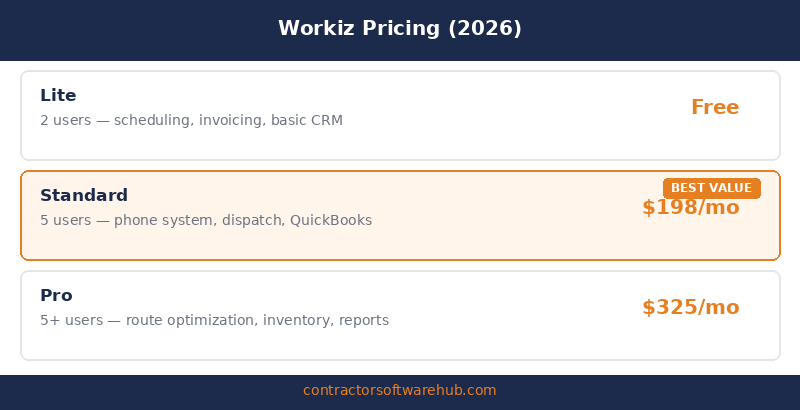
Workiz publishes pricing at workiz.com/pricing-plans. Annual billing discounts are available (Workiz says you can save $400+ annually). The prices below reflect both monthly and annual rates where confirmed.
| Plan | Monthly Price | Annual Price (per month) | Users Included | What You Get |
|---|---|---|---|---|
| Lite | Free | Free | 2 | Scheduling, 20 jobs/invoices/estimates, mobile app, online booking |
| Kickstart | $225/mo | ~$187/mo | 3 | Unlimited jobs, online payments, local phone number, 2 automations, client management, built-in reports |
| Standard | $275/mo | ~$229/mo | 5 | Everything in Kickstart + QuickBooks Online, 5 automations, location tracking, custom fields, service areas, subcontractor management |
| Pro | $325/mo | ~$270/mo | 5 | Everything in Standard + Genius Scheduling, Genius Leads, custom reports, 10 automations, performance pay |
| Ultimate | Quote-based | Quote-based | Custom | Everything in Pro + inventory management, franchise management, 30 automations, sales proposals, Zapier, Open API |
The hidden cost: extra users. This is where Workiz’s pricing catches people off guard. The Standard plan includes 5 users. Each additional user costs $55/month (monthly billing) or $46/month (annual). On Pro, it is $65/month or $54/month annually.
| Team Size | Workiz Standard (monthly) | Workiz Standard (annual) | Jobber Grow (for comparison) |
|---|---|---|---|
| 5 users | $275/mo | $229/mo | $199/mo (up to 15 users) |
| 10 users | $550/mo | $459/mo | $199/mo |
| 15 users | $825/mo | $689/mo | $199/mo |
| 20 users | $1,100/mo | $919/mo | $539/mo |
At 5 users, Workiz Standard and Jobber Grow are in the same range. At 10+ users, the gap widens significantly. Workiz offers stronger dispatch and inventory features — whether those features justify the per-user premium depends on your operation. For the full comparison, see our Jobber vs. Workiz breakdown.
What Users Actually Say
Dispatch and scheduling are the most praised features (G2 reviewers, 4.5/5 from 224 reviews). “Workiz has been a game-changer for managing our daily operations. The scheduling and dispatching features are intuitive and easy to use. The real-time tracking of jobs and technicians helps us stay organized and avoid scheduling conflicts.” — Verified G2 reviewer. The dispatch board and automated scheduling workflow are consistently the top reason users stay on the platform.
Automations save real time (G2 reviewers). “The automations are the standout feature. Automatic text messages based on job status save a significant amount of time. The route planning map is solid and helps schedule jobs efficiently.” — G2 reviewer who gave 5 stars despite noting pricing concerns. For teams processing high job volumes, the automation layer reduces the manual work that eats office hours.
Pricing is the most common complaint (G2 and Capterra reviewers). “Pricing is my biggest concern. It’s expensive, and many new features come with additional costs. I don’t like that phone plans charge by the minute and per text message.” — G2 reviewer. A Capterra reviewer added: “Monthly fee expensive for a small business or sole proprietor.” The pattern is clear: users value the features but feel the total cost of ownership is not as transparent as it should be.
Mobile app opinions are mixed (Google Play and G2 reviewers). The Google Play rating is 4.1/5 from 305 reviews — decent but with enough complaints about freezing, blank screens, and payment processing crashes to be worth testing on your team’s devices. G2 reviewers note: “The mobile app can experience lag” and “the mobile application for field use often experiences disconnections.” It works for most teams, but it is not bulletproof.
All-in-one consolidation gets real appreciation (Capterra reviewers, 4.4/5 from 218 reviews). “Before Workiz, we used spreadsheets and phone calls to manage jobs. It was chaotic. Now, everything from job scheduling to invoicing is handled in one place.” — Verified G2 reviewer. “I like that I can control everything in one app — processing payments, calling customers, having an automatic calculator for salary.” — Capterra reviewer. For teams coming from manual processes, the consolidation alone justifies the platform.
Bottom Line
Workiz is a strong fit for dispatch-heavy field service teams of 3–20 technicians who need more than basic scheduling. The dispatch board, route optimization, inventory management, and integrated phone system are all a step above what entry-level platforms like Jobber offer. The free Lite tier lets you test the core workflow before spending anything, which is a genuine advantage in a category where most platforms ask you to pay first.
The honest catch is pricing. Workiz looks affordable at the tier level, but per-user fees, phone system charges, and feature gates between plans mean your actual bill can land well above the advertised price. A 10-person team on Standard can easily hit $550/month. That is not unreasonable for what you get, but it requires more budgeting homework than Jobber’s flat-tier approach.
If Workiz is on your shortlist, start with the free Lite plan to test the interface. Then price out the tier that includes the features you actually need — not the one that looks cheapest — and budget for extra users separately. For a head-to-head comparison with the most common alternative, read our Jobber vs. Workiz breakdown. Also worth reviewing: Housecall Pro Review and Best Scheduling Software for Contractors.
FAQ
Is Workiz worth it?
For dispatch-heavy field service teams with 3–20 technicians who need route optimization, inventory tracking, and integrated phone communication, Workiz is worth serious consideration. The G2 rating of 4.5/5 from 224 reviews and Capterra rating of 4.4/5 from 218 reviews reflect a platform that works well for its target audience. The main concern is pricing complexity: your actual monthly cost will likely be higher than the advertised tier price once you add extra users and phone system usage.
How much does Workiz cost?
Workiz offers five tiers: Lite (free, 2 users), Kickstart ($225/month or ~$187 annually, 3 users), Standard ($275/month or ~$229 annually, 5 users), Pro ($325/month or ~$270 annually, 5 users), and Ultimate (quote-based). Each extra user beyond the included seats costs $46–$65/month depending on the plan and billing cycle. Phone system usage (per-minute and per-text charges) is additional. Verify current pricing at workiz.com/pricing-plans.
Does Workiz have a free plan?
Yes. The Lite tier is permanently free for up to 2 users. It includes scheduling, mobile app access, online booking, and up to 20 jobs, invoices, and estimates per month. It is limited — no QuickBooks integration, no automations, no phone system — but it gives solo operators and 2-person crews a way to evaluate the platform’s core scheduling and invoicing workflow without paying anything.
How does Workiz compare to Jobber?
Workiz wins on dispatch depth, route optimization, inventory management, and integrated phone/SMS. Jobber wins on pricing simplicity, cleaner UX, and better small-crew value (Core starts at $29/month for 1 user). At 5 users, Workiz Standard ($275/month) and Jobber Grow ($199/month) are in a comparable range but Jobber is cheaper. At 10+ users, the per-user gap widens significantly in Jobber’s favor. The right choice depends on whether your operation needs Workiz’s stronger dispatch and inventory features enough to justify the premium. See our full Jobber vs. Workiz comparison.
What are the biggest downsides of Workiz?
Three main issues. First, pricing complexity: per-user fees, phone charges, and feature gates between tiers make total cost harder to predict than competitors with flat-tier pricing. Second, mobile app stability: the Google Play rating is 4.1/5 but carries consistent complaints about freezing, lag, and payment processing failures. Third, customer support inconsistency: some users report great responsiveness while others describe long waits and difficulty reaching support for non-trivial issues.
What trades use Workiz?
Workiz is most commonly used by HVAC, plumbing, electrical, appliance repair, locksmith, junk removal, carpet cleaning, and general field service businesses. The platform’s dispatch-focused design and route optimization make it a particularly strong fit for trades that run multiple service calls per day across a metro area. Multi-location operations and franchise businesses can also use Workiz’s native multi-location and franchise management features on higher tiers.