
Disclosure: Some links on this page are affiliate links. If you sign up through one, I earn a small commission at no extra cost to you. My recommendations don’t change based on that.
Jobber Alternatives (2026): 5 Options Worth Considering
Jobber Core at $29/month is hard to beat for a solo operator. The friction starts at $149–$299/month for teams — and at that price range, the alternatives deserve a serious look.
Jobber is one of the most polished field service platforms on the market. The interface is clean, the mobile app is consistently rated among the best in the category, and the $29/month Core plan gives solo operators a real starting point without overpaying.
The problem starts when your business grows. Add a second person and you’re jumping to Connect Teams at $149/month. Need job costing and two-way texting? That’s Grow Teams at $299/month. By the time you have 15 users on Plus, you’re at $529/month — and every seat beyond that adds $29 more.
That pricing curve is the single biggest reason contractors start searching for Jobber alternatives. Not because Jobber is bad software. Because the economics change when you’re no longer solo.
This page covers five alternatives worth evaluating, what each one does better (and worse) than Jobber, and when Jobber still wins. If you want context on Jobber itself first, start with our Jobber review and Jobber pricing breakdown.
Right for: Contractors actively comparing Jobber against other field service platforms — whether you’re evaluating software for the first time, hitting a pricing ceiling, or outgrowing Jobber’s feature set as your team scales past 5–10 people.
Not for: Solo operators happy on Jobber Core, construction/project-management companies (see Buildertrend), or anyone looking for a free solution — most serious alternatives still cost $150+/month for a real team.
Why Contractors Search for Jobber Alternatives
Before jumping into the alternatives, it helps to understand the specific friction points that push contractors away from Jobber. These aren’t vague complaints — they show up consistently across G2, Capterra, Reddit, and contractor forums.
1. Pricing Scales Fast After Core
The jump from solo to team is where the sticker shock hits. Core works at $29/month, but it’s a single-user plan with no QuickBooks sync, no time tracking, and no automated reminders. The moment you need any of that, you’re on Connect — $99/month solo or $149/month for a 5-person team. That’s a 5x increase from where you started.
Grow Teams is $299/month for 10 users. Plus is $529/month for 15. Every additional user beyond the included count costs $29/month. A 20-person operation on Plus pays $529 + (5 × $29) = $674/month. For context, Service Fusion’s unlimited-user Starter plan is $208/month for the same headcount.
2. Marketing Tools Are Basic (or Locked Behind Add-Ons)
Jobber’s Marketing Suite — review requests, referral campaigns, email marketing — is an add-on at $79/month on lower plans. It’s only included on Plus at $529/month. Housecall Pro, by comparison, includes review management and marketing tools starting at the $149/month Essentials tier.
3. No Real Inventory Management
Jobber tracks jobs and expenses, but it doesn’t handle parts inventory, stock levels, or warehouse management. If your business lives on parts — HVAC, plumbing, electrical — you’ll need a separate system or a platform like Workiz or FieldEdge that handles inventory natively.
4. Limited Job Costing Depth
Job costing exists on Grow and above, but it’s focused on tracking revenue versus expenses at the job level. It’s not deep margin analysis. Contractors who need detailed cost breakdowns across labor, materials, and overhead often find Jobber’s job costing surface-level compared to tools like Service Fusion’s Plus plan or FieldEdge.
5. Multi-Crew Dispatch Gets Thin at Scale
Jobber’s dispatch board works well for small teams. Once you’re running 10+ techs across multiple crews, some contractors find the scheduling and dispatch features insufficient — no advanced route optimization, no technician skill-matching, and limited real-time fleet visibility without add-ons.
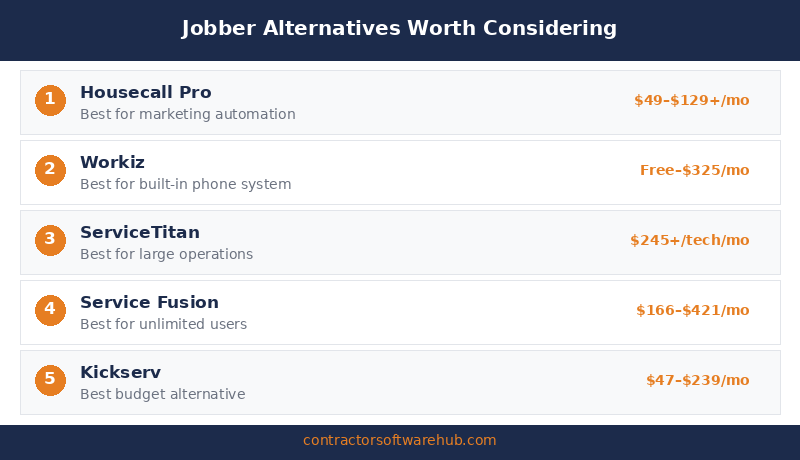
1. Housecall Pro — Best for Marketing Automation and Review Generation
If the reason you’re leaving Jobber is weak marketing tools, Housecall Pro is the first place to look. Review management, automated follow-ups, postcards, and email marketing campaigns come built into the Essentials plan — not as a $79/month add-on.
Housecall Pro’s strength is the customer lifecycle after the job. Automated review requests go out when a job closes. Postcards and email campaigns keep past customers engaged. For a home service business where Google reviews directly drive new leads, that’s real revenue infrastructure, not a nice-to-have.
Pricing: Basic starts at $59/month annual (1 user). Essentials is $149/month (up to 5 users). MAX is $299/month (up to 8 users, extra users $35/month each). There’s a 14-day free trial on the MAX plan with no credit card required.
What you give up vs. Jobber: Jobber’s interface is cleaner and more intuitive — that’s a real difference, not marketing copy. Housecall Pro is functional but less polished, particularly on the scheduling side. The pricing structure is also less transparent: the jump from Basic (1 user) to Essentials (5 users) at $149/month is steep if you only need 2-3 seats. And there’s no inventory management on any plan.
Best for: 2–8 person home service crews (cleaning, HVAC, plumbing, electrical) that want marketing and review automation built into their FSM instead of bolted on. If Google reviews and repeat business are your growth engine, Housecall Pro earns its cost. See our full Housecall Pro review and Jobber vs. Housecall Pro comparison for a deeper breakdown.
Ratings: G2: 4.3/5 (202 reviews) · Capterra: 4.7/5 (2,737 reviews)
2. Workiz — Best for Inventory and Built-In Phone Tools
Workiz is the alternative that makes the most sense when your operation depends on parts tracking and phone-based dispatching. Built-in VoIP calling, call recording, SMS, and a local business number come standard starting at Kickstart. Asset tracking and AI-powered scheduling arrive on the Pro plan.
The other standout: Workiz has a free tier. Lite gives you 2 users, scheduling, online booking, and up to 20 jobs, invoices, and estimates per month. It’s not a full operating platform — but it’s enough to test the workflow before committing money.
Pricing: Lite is free (2 users, 20-job cap). Kickstart is $225/month ($187/month annual) for 3 users. Standard is $275/month ($229/month annual) for 5 users with QuickBooks integration and 5 automations. Pro is $325/month ($270/month annual) for 5 users plus AI features and asset tracking. Extra users on Standard cost $46–$55/month depending on billing cycle.
What you give up vs. Jobber: Jobber’s UX is meaningfully better. Workiz has more features per dollar, but the interface requires more time to learn and isn’t as intuitive out of the box. The client-facing experience — quote approval, online booking, customer portal — isn’t as polished as Jobber’s. And the pricing, while competitive, doesn’t offer the same clean entry point as Jobber Core’s $29/month.
Best for: 2–5 person service teams (especially locksmith, appliance repair, garage door, plumbing) that need phone tools and inventory baked into the platform instead of running them separately. If you’re currently paying for a separate phone system alongside Jobber, Workiz might consolidate your stack. See our Jobber vs. Workiz comparison.
Ratings: G2: 4.5/5 (224 reviews) · Capterra: 4.5/5 (218 reviews)
3. Service Fusion — Best for Unlimited-User Flat-Rate Pricing
This is the Jobber alternative that makes the most financial sense once you’re past 10 technicians. Every Service Fusion plan — Starter, Plus, and Pro — includes unlimited users. No per-seat charges. No surprise fees when you hire your 11th tech or add a second dispatcher.
That pricing model flips the math on per-user platforms like Jobber.
Here’s the comparison at 15 total users (10 field techs + 5 office/dispatch):
| Platform | Plan | Monthly Cost (Annual Billing) |
|---|---|---|
| Jobber Grow Teams | 10 users included + 5 extra × $29 | $444/month |
| Service Fusion Starter | Unlimited users | $208/month |
| Annual savings with Service Fusion | $2,832/year | |
At 20 users, the gap widens further. Jobber Plus at $529 + 5 extra seats = $674/month. Service Fusion Starter is still $208/month. That’s a $5,592/year difference — enough to fund a part-time hire.
Pricing: Starter is $208/month annual ($245 monthly) with scheduling, dispatching, estimates, invoicing, QuickBooks, and reporting. Plus is $325/month annual with inventory management and job costing. Pro is $533/month annual with eSign, customer portal, and open API. All plans are month-to-month with a 15% discount on annual billing (paid upfront).
What you give up vs. Jobber: The mobile app is a genuine weak point. Service Fusion’s Android app sits at 2.7/5 on Google Play. Jobber’s sits above 4 stars. The interface is older and less intuitive. There’s also no free trial — you have to pay for at least one month to test it. And for a 2-3 person shop, the $208/month entry price is actually more expensive than Jobber Connect Teams at $149/month. The unlimited-user model only becomes a clear advantage once you’re scaling past 8-10 people.
Best for: Growing service businesses with 10+ technicians plus office staff where per-user pricing is becoming the most expensive line item in the software budget. HVAC, plumbing, and electrical shops that need predictable costs as they hire are the sweet spot. The bigger the team, the better the value.
Ratings: G2: 4.1/5 (85+ reviews) · Capterra: 4.3/5 (290 reviews)
4. FieldEdge — Best for HVAC-Specific Operations
FieldEdge isn’t a general-purpose Jobber alternative — it’s a trade-specific one. If you run an HVAC, plumbing, or electrical operation and need equipment tracking, flat-rate pricebook management, and service agreement workflows built into the platform, FieldEdge goes deeper than Jobber does in those areas.
The flat-rate pricing tools are the headline feature. FieldEdge’s pricebook helps techs present options in the field with pre-built good/better/best pricing — a workflow that drives higher average ticket sizes in HVAC and plumbing specifically. Service agreement tracking, equipment history by customer, and built-in maintenance scheduling round out the trade-specific feature set.
Pricing: FieldEdge doesn’t publish pricing. You have to request a demo. Based on community-reported data and third-party research, expect around $100/month per office user and $125/month per field technician. Plans are tiered (Select, Premier, Elite) with deeper features at higher tiers. Implementation fees range from $500 to $2,000+. A 5-tech shop with 2 office users typically runs $825/month before add-ons — significantly more than Jobber.
What you give up vs. Jobber: Transparent pricing, for starters. Jobber publishes every plan and fee on its website. FieldEdge requires a sales call. The onboarding process is also heavier — expect a 5-week implementation timeline, not same-day setup. And the mobile app reviews are rough: 2.0/5 on Google Play, 1.8/5 on the Apple App Store as of mid-2025. The desktop product is solid, but the field experience frustrates some technicians.
Best for: HVAC and mechanical contractors with 5+ technicians who sell service agreements, use flat-rate pricing, and need equipment tracking tied to customer records. If your revenue model depends on maintenance plans and upselling replacements, FieldEdge’s trade-specific tools can pay for themselves. See our FieldEdge review.
Ratings: G2: 4.0/5 (85 reviews) · Capterra: 4.2/5 (306 reviews)
5. ServiceTitan — Enterprise Step-Up for 20+ Technicians
ServiceTitan is not a Jobber alternative in the traditional sense. It’s a category above — enterprise-grade software designed for large residential service operations with dedicated office staff, multiple departments, and the budget to match. If you’re outgrowing Jobber because your business has 20+ techs and needs marketing attribution, call tracking, advanced reporting, and deep operational control, ServiceTitan is the logical step-up.
Where ServiceTitan separates itself is in the data layer. Marketing spend attribution (how much revenue came from each ad campaign), call recording and tracking, real-time KPI dashboards per technician, and multi-location management are features most mid-market platforms don’t offer at all. For a company doing $5M+ in revenue, that visibility can drive decisions worth far more than the software cost.
Pricing: ServiceTitan doesn’t publish pricing. Based on community-reported data from G2, TrustRadius, and Reddit, expect $245–$500+ per technician per month depending on the tier (Starter, Essentials, The Works). A 10-technician shop at mid-range pricing ($300/tech) pays roughly $3,000/month. Implementation fees run $5,000–$50,000 depending on complexity. There’s a 12-month minimum contract. This is not a casual commitment.
What you give up vs. Jobber: Everything that makes Jobber easy. Setup takes months, not minutes. The learning curve is steep. The cost is 5–10x higher. And for a business under $2M in revenue, ServiceTitan’s complexity usually creates more overhead than it eliminates. Multiple G2 reviewers describe the platform as “a beast” — meant as both a compliment and a warning. See our ServiceTitan review.
Best for: HVAC, plumbing, and electrical companies with 20+ technicians, $3M+ in revenue, dedicated admin staff, and the patience for a 3–6 month onboarding process. If you’re a 5-person crew considering ServiceTitan, you’re almost certainly overpaying for complexity you don’t need.
Ratings: G2: 4.5/5 (353 reviews) · Capterra: 4.3/5 (325 reviews)
Side-by-Side Comparison
| Feature | Housecall Pro | Workiz | Service Fusion | FieldEdge | ServiceTitan |
|---|---|---|---|---|---|
| Starting price | $59/mo (1 user) | Free (Lite, 2 users) | $208/mo annual | Quote-based (~$100–125/user) | ~$245/tech/mo |
| Free trial | 14 days (MAX tier) | Free Lite plan | No | No (demo only) | No (demo only) |
| User model | Per-plan tiers (1/5/8+) | Per-plan tiers (2/3/5) | Unlimited users, all plans | Per-user ($100–125/mo) | Per-technician ($245–500+) |
| Mobile app (Google Play) | 4.0+ ★ | 4.0+ ★ | 2.7 ★ | 2.0 ★ | 3.5+ ★ |
| Marketing tools | Built-in from Essentials | Basic lead tracking | Limited | MarketingEdge (Elite only) | Marketing Pro (add-on) |
| Inventory management | No | Asset tracking (Pro) | Yes (Plus plan) | Warehouse mgmt (Elite) | Yes (built-in) |
| Contract required | No | No | No | Varies | 12-month minimum |
| G2 / Capterra | 4.3 / 4.7 | 4.5 / 4.5 | 4.1 / 4.3 | 4.0 / 4.2 | 4.5 / 4.3 |
When Jobber Still Wins
Jobber isn’t the tool everyone should leave. For a lot of contractors, it’s still the right pick — and it would be dishonest to pretend otherwise just because this is an alternatives page.
The UX is the cleanest in the category. Jobber’s interface requires less training, less onboarding, and less frustration than every alternative on this list. If you value simplicity and want software your crew can learn in a day, Jobber earns that. None of the five alternatives above match it on pure usability.
Pricing is fully transparent. Every plan, every tier, every add-on fee is published on the website. You can price out your exact configuration without sitting through a demo or negotiating with a sales rep. In a category where FieldEdge and ServiceTitan hide their pricing behind contact forms, that transparency matters.
Core at $29/month is genuinely great for solo operators. If you’re one person running a service business and you need scheduling, quoting, invoicing, online booking, and a mobile app, Core does the job at a price that’s hard to undercut with any serious FSM platform.
The mobile app is best-in-class. Jobber’s iOS and Android apps consistently rate above 4 stars. Technicians can manage jobs, clock time, capture photos, and collect payments from the field without fighting the interface. Service Fusion and FieldEdge can’t say the same.
The 14-day trial gives you Grow-level features. That’s a legitimate test drive — not a stripped-down demo. You see the real product before paying anything.
If you’re a solo operator or a 2–5 person crew that values clean design, transparent costs, and a quick setup, Jobber is still worth evaluating before you look elsewhere. The alternatives on this page make more sense when the per-user math stops working in your favor — usually around 8–10+ people.
Bottom Line
There’s no single “best Jobber alternative.” The right pick depends on what’s actually pushing you away:
- Want better marketing tools? Housecall Pro builds reviews, campaigns, and follow-ups into the platform instead of charging extra.
- Need inventory and built-in phone? Workiz gives you parts tracking and VoIP from the Kickstart tier, plus a free Lite plan to test with.
- Scaling past 10 techs and tired of per-user fees? Service Fusion charges a flat rate for unlimited users — and the savings compound fast.
- Running HVAC with service agreements and flat-rate pricing? FieldEdge goes deeper on trade-specific workflows than Jobber does.
- Enterprise-ready with 20+ techs and dedicated office staff? ServiceTitan is the step-up — if the budget and timeline allow it.
And if none of those pain points describe your situation, Jobber might still be the right call. It’s a good product — the alternatives just matter more once your team and budget outgrow what Core and Connect offer.
FAQ
What is the best alternative to Jobber?
It depends on why you’re looking. For most home service contractors, Housecall Pro is the closest overall alternative — similar price range, stronger marketing tools, and a 14-day free trial. For larger teams where per-user pricing is the issue, Service Fusion’s unlimited-user model is the better financial play. There’s no single answer because the alternatives solve different problems.
Is Housecall Pro better than Jobber?
In some areas, yes. Housecall Pro includes review management and marketing automation at the Essentials tier ($149/month) where Jobber charges $79/month extra or requires Plus at $529/month. For customer follow-up and reputation management, HCP has the edge. But Jobber has a cleaner interface, a better mobile app, and more transparent pricing. For a deeper comparison, see our Jobber vs. Housecall Pro breakdown.
What is the cheapest Jobber alternative?
Workiz Lite is free for up to 2 users with basic scheduling, invoicing, and online booking — but it caps at 20 jobs per month, so it’s more of a test drive than a permanent plan. For paid alternatives, Housecall Pro Basic starts at $59/month for a single user on annual billing. Service Fusion starts at $208/month but includes unlimited users, which makes it the cheapest per-user option for larger teams.
Can I switch from Jobber to another platform easily?
The switch itself is manageable — most FSM platforms offer data import or onboarding help to migrate customer records, job history, and invoices. The real challenge is retraining your team on a new interface and rebuilding any automations or workflows you set up in Jobber. Budget 2–4 weeks for a clean transition on a small team. Platforms like ServiceTitan and FieldEdge require longer onboarding (5 weeks to several months).
Is Service Fusion really unlimited users?
Yes. Every Service Fusion plan — Starter ($208/month annual), Plus ($325/month), and Pro ($533/month) — includes unlimited users with no per-seat fees. Whether you have 3 users or 30, the price stays the same. That’s confirmed on their pricing page and is the platform’s main selling point against per-user tools like Jobber. The catch: no free trial, and the $208/month entry price is higher than Jobber’s lower tiers for very small teams.