
Disclosure: Some links on this page are affiliate links. If you sign up through one, I earn a small commission at no extra cost to you. My recommendations don’t change based on that.
Housecall Pro Pricing (2026): What You’ll Actually Pay
Starts at $59/mo for a single user — but most contractors land on Essentials at $149/mo the moment they hire their first employee. Here’s what the real number looks like.
Housecall Pro starts at $59 a month. That number is on the pricing page and it’s technically accurate. It’s also the price for a single user with no QuickBooks integration, no GPS tracking, no marketing tools, and no employee management. The moment you need a second person on the account, you’re jumping to Essentials at $149 a month. That’s a $90 increase with no plan in between.
This is the pricing reality most Housecall Pro evaluators don’t see until they’re already inside the free trial. The headline number gets you in the door. The plan you’ll actually run costs meaningfully more. This breakdown covers what each tier includes, what it doesn’t, and what a realistic year-one bill looks like for a small service operation.
Right for: Residential service contractors (HVAC, plumbing, cleaning, electrical, landscaping) running 1–8 person teams who need scheduling, dispatching, invoicing, and strong customer communication tools in one platform.
Not for: Solo contractors who only need basic invoicing, larger operations that need flat-rate pricing as headcount grows, or anyone who needs advanced reporting without paying for the MAX tier.
Housecall Pro Pricing Plans (2026)
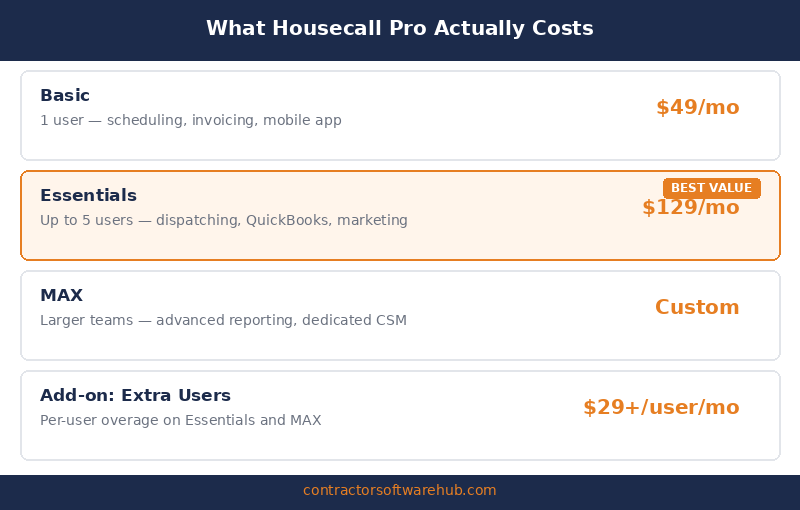
Here’s the full pricing breakdown as published on Housecall Pro’s pricing page, verified April 2026. All annual prices reflect monthly billing on an annual commitment.
| Plan | Annual Price | Monthly Price | Users Included | Key Features |
|---|---|---|---|---|
| Basic | $59/mo | $79/mo | 1 | Scheduling, dispatching, invoicing, online booking, review management, price book |
| Essentials | $149/mo | $189/mo | Up to 5 | Basic + QuickBooks sync, GPS tracking, email marketing, postcards, equipment tracking, checklists |
| MAX | $299/mo | $329/mo | Up to 8 | Essentials + advanced reporting, dedicated onboarding, escalated support, all add-ons included free |
Additional users on the MAX plan cost $35/month each beyond the 8 included seats. Basic is locked to a single user. Essentials caps at 5 users. There’s no option to add extra seats on Basic or Essentials — if you outgrow the user limit, you upgrade to the next tier.
The free trial runs 14 days with MAX-level access and no credit card required. That’s genuinely useful — you see the full product, not a stripped-down version. Your data is saved if the trial expires, so there’s no pressure to rush the evaluation.
What the $59/Month Starting Price Actually Gets You
Basic is a solo operator plan, and it shows. You get scheduling, dispatching, invoicing, online booking, basic review management, and a price book. That covers the fundamentals for a one-person shop that needs to look professional to customers.
What Basic doesn’t include is where the friction starts. No QuickBooks integration — you’re manually reconciling your books or paying for a third-party connector. No GPS tracking for field techs (irrelevant if you’re solo, critical the moment you hire). No marketing tools like email campaigns or postcards. No equipment tracking. No employee checklists.
For a true solo operator who handles everything themselves and doesn’t need accounting integration, Basic works. It’s a functional scheduling-and-invoicing tool with a solid mobile app and decent online booking. The card processing rate starts at 2.59%, which is competitive.
The problem is the ceiling. The moment you hire one employee — even a part-time helper — Basic can’t accommodate a second user. You’re forced to Essentials at $149/mo. That’s not a gradual step up. That’s a 153% price increase to add one person to your account.
The Hidden Costs Most Contractors Miss
The plan price is the floor, not the total. Housecall Pro’s real cost includes several line items that aren’t obvious from the pricing page.
Feature-based add-ons: The Sales Proposal Tool and Recurring Service Plans are free on the MAX plan but cost extra on Basic and Essentials. Together, these add-ons run approximately $80/month. If your business relies on service agreements or detailed proposals, that’s nearly $1,000/year on top of your base subscription.
Payment processing fees: Card processing starts at 2.59% per transaction. Bank payments carry a 1% fee. On $150,000 in annual card revenue, that’s roughly $3,885 in processing fees — not a Housecall Pro markup exactly, but a cost that lives inside the platform and affects your total cost of ownership. ACH payments at 1% are significantly cheaper if your customers will use them.
Per-user costs on MAX: If your team grows beyond 8 people on the MAX plan, each additional user costs $35/month. A 12-person team on MAX pays $299 + ($35 × 4) = $439/month. A 15-person team: $299 + ($35 × 7) = $544/month. The per-user fee adds up fast once you pass the included seat count.
Price increases over time: Multiple G2 and Capterra reviewers from 2024–2025 describe Housecall Pro raising prices on existing customers. The current Essentials tier was previously listed at $129/month in some sources. Plan on the number you see today potentially increasing during your subscription.
Year-One Cost: What a 5-Tech Operation Really Pays
This is where pricing pages stop being useful and real math starts. Here’s what a realistic 5-technician residential service company actually pays in year one on Housecall Pro.
Scenario: 5 field techs + 1 office/dispatcher = 6 users total.
Essentials only covers 5 users. With 6 people, you have two options:
| Cost Item | Option A: Essentials (5 users, office shares) | Option B: MAX (6 users included) |
|---|---|---|
| Monthly subscription (annual) | $149/mo | $299/mo |
| Annual subscription | $1,788 | $3,588 |
| Add-ons (Sales Proposals + Service Plans) | $80/mo = $960 | $0 (included) |
| Payment processing (~$200K revenue at 2.59%) | ~$5,180 | ~$5,180 |
| Year-One Total | ~$7,928 | ~$8,768 |
Option A works only if your office person shares a tech’s login or you stay at exactly 5 named users. Option B (MAX) costs $840 more per year in subscription but includes all add-ons and gives you room to grow to 8 users. For most growing operations, MAX ends up being the realistic landing point.
The payment processing line is the wildcard. If your customers pay mostly by check or bank transfer, that number drops dramatically. If you run most revenue through card processing in-app, it’s a significant annual cost that should factor into your software budget.
Is Housecall Pro Worth It?
The answer depends entirely on which tier you’re evaluating and how many people need access.
Basic ($59/mo) — Worth it for true solo operators only
If you work alone, don’t need QuickBooks integration, and primarily need scheduling, invoicing, and a professional online booking page, Basic delivers enough to justify $59/month. The review automation and online booking alone can generate measurable business for a solo residential contractor. But the moment your business requires a second user, Basic becomes a dead end.
Essentials ($149/mo) — The best value tier for small teams
Essentials is where Housecall Pro starts earning its price. QuickBooks sync, GPS tracking, marketing tools, and up to 5 users make this a complete operations platform for a small residential crew. At $149/month for 5 users, the per-user cost is $29.80 — competitive with most alternatives in this category. If your team stays at or under 5 people and you don’t need the premium add-ons, Essentials is genuinely solid.
MAX ($299/mo) — Worth it for 6–10 person teams that need add-ons
MAX makes financial sense when you’d otherwise be paying for Essentials plus add-ons ($149 + $80 = $229/mo) and need more than 5 users. At $299/month for 8 users with all add-ons included, the incremental cost over Essentials-plus-add-ons is $70/month for 3 additional user seats and premium support. For a 6–8 person team, that math works. Beyond 8 users, the $35/month per-user fee starts to erode the value, and flat-rate alternatives like Service Fusion deserve serious consideration.
How HCP Pricing Compares to Jobber
Jobber is the most common comparison point for Housecall Pro buyers. Here’s how the pricing stacks up at different team sizes. Both platforms use annual billing rates.
| Team Size | Housecall Pro | Jobber | Difference |
|---|---|---|---|
| 1 user (solo) | $59/mo (Basic) | $29/mo (Core) | Jobber saves $30/mo |
| 5 users | $149/mo (Essentials) | $149/mo (Connect Teams) | Same price |
| 10 users | $369/mo (MAX + 2 extra) | $299/mo (Grow Teams) | Jobber saves $70/mo |
| 15 users | $544/mo (MAX + 7 extra) | $529/mo (Plus) | Jobber saves $15/mo |
At the solo level, Jobber is half the price. At 5 users, they land at the same number — but HCP Essentials includes GPS tracking and marketing tools that Jobber locks behind Connect or Grow. At 10 users, HCP gets meaningfully more expensive because MAX only covers 8 seats.
The feature trade-off matters as much as the price. Housecall Pro’s marketing automation — automated review requests, email campaigns, postcards — is stronger than Jobber’s at the Essentials tier. Jobber’s quoting tools and job costing (on Grow) are deeper. If customer acquisition through reviews and marketing is your primary growth lever, HCP Essentials may justify the higher solo entry price. If internal operations and reporting matter more, Jobber’s pricing structure gives you more room to scale. See our full Jobber vs. Housecall Pro comparison for the feature-by-feature breakdown.
| Feature | Housecall Pro | Jobber |
|---|---|---|
| QuickBooks sync | Essentials ($149/mo) | Connect ($99–$149/mo) |
| GPS tracking | Essentials ($149/mo) | Connect Teams ($149/mo) |
| Email/postcard marketing | Essentials ($149/mo) | Plus ($529/mo) or add-on |
| Automated review requests | Basic ($59/mo) | Grow ($149–$299/mo) or add-on |
| Job costing | Basic ($59/mo) | Grow ($149–$299/mo) |
| Advanced reporting | MAX ($299/mo) | Grow ($149–$299/mo) |
| Free trial | 14 days (MAX features) | 14 days (Grow features) |
| Per-user add-on cost | $35/mo (MAX only) | $29/mo |
What Users Actually Say
The pricing tier jump is the most-cited frustration. Across Capterra (4.7/5, 2,700+ reviews) and G2 (4.3/5, 200+ reviews), the recurring complaint isn’t that Housecall Pro is bad software. It’s that the features most contractors want — QuickBooks sync, GPS, marketing — require the $149/month Essentials tier, not the $59/month Basic plan. Multiple reviewers describe feeling pushed toward higher tiers to access features that should be standard.
One Capterra reviewer from a 5-tech HVAC company put it directly: “I signed up for the mid-tier and then realized the features I actually wanted required the next tier up. By the time I added what I needed, I was paying more than I expected.”
The customer-facing tools justify the cost for many. The strongest positive pattern comes from contractors who credit HCP’s automated review requests with measurable Google review growth. One cleaning company reviewer described going from 40 to over 200 Google reviews in a year after enabling the automation. For businesses where local search visibility drives growth, this feature alone can deliver ROI that outweighs the subscription cost.
Price increases on existing customers draw real frustration. Recent G2 reviewers describe HCP raising prices without proportional feature additions. One reviewer noted: “Was happy for the first few years, then as they grew, they cared less about their tenured customers. They began to take away or charge more for the features we were used to having.” This isn’t universal, but it’s a consistent enough pattern to factor into your long-term budgeting.
Bottom Line
Housecall Pro’s pricing is fair for what it delivers, but the structure catches contractors off guard. The $59 Basic plan is a solo-only entry point, not the version most service businesses actually run. Essentials at $149/month is where the platform earns its reputation — QuickBooks sync, GPS tracking, marketing automation, and 5 user seats for under $30/user. MAX at $299/month makes sense for 6–8 person teams that would otherwise pay for add-ons separately.
The honest risk is that you’ll underestimate which tier you need at signup. Use the 14-day free trial at the MAX level, build your real workflow, and price the platform with your actual team size and the add-ons you’d want. That number — not the headline $59 — is what belongs in your software budget. For the full feature breakdown, see our Housecall Pro review.
FAQ
How much does Housecall Pro cost per month?
Housecall Pro costs $59/month (Basic, 1 user), $149/month (Essentials, up to 5 users), or $299/month (MAX, up to 8 users) on annual billing. Monthly billing runs $79, $189, and $329 respectively. Additional users on the MAX plan cost $35/month each. Most small service businesses land on Essentials or MAX once they factor in the features they actually need.
Is there a free version of Housecall Pro?
No free plan, but there’s a 14-day free trial with full MAX-level access and no credit card required. The trial gives you the complete product experience, not a limited version. Your data is preserved if the trial expires, so you can pick up where you left off by entering billing information.
Is Housecall Pro more expensive than Jobber?
At the solo level, yes — HCP Basic is $59/month vs. Jobber Core at $29/month. At 5 users, they’re identical at $149/month, though HCP Essentials includes marketing tools that Jobber gates behind higher tiers. At 10+ users, HCP gets more expensive because the MAX plan only includes 8 seats and charges $35/month per additional user, while Jobber Grow Teams includes 10 seats at $299/month.
What are the hidden costs of Housecall Pro?
Three main ones. First, the Sales Proposal Tool and Recurring Service Plans add-ons cost approximately $80/month on Basic and Essentials (free on MAX). Second, card processing runs 2.59%+ per transaction — on $200K in annual card revenue, that’s roughly $5,180 in fees. Third, per-user charges of $35/month per seat beyond MAX’s 8-user limit add up fast for growing teams.
Does Housecall Pro charge per user?
Partially. Basic includes 1 user with no option to add more. Essentials includes up to 5 users. MAX includes up to 8 users and charges $35/month for each additional user. The biggest pain point is the forced tier jump from 1 user on Basic to 5 users on Essentials — there’s no plan for a 2–4 person team that doesn’t cost $149/month.
Is the Housecall Pro free trial worth using?
Yes. The 14-day trial unlocks MAX-level features with no credit card, which means you see the full platform — not a limited demo. Use it to test your real workflow: create a few jobs, run invoices, test the review automation, and try the QuickBooks sync. That gives you a much better sense of which tier you actually need and what the real cost will be.