
Disclosure: Some links on this page are affiliate links. If you sign up through one, I earn a small commission at no extra cost to you. My recommendations don’t change based on that.
Housecall Pro Alternatives (2026)
Five options worth evaluating when HCP’s pricing tiers outpace your budget — or your operation outgrows what the platform delivers.
Housecall Pro’s Basic plan looks reasonable at $59/month. The moment you hire your first employee, you’re on Essentials at $149/month. That’s a $90/month step that catches a lot of contractors off guard — and it’s the most common reason people start searching for alternatives.
This isn’t a list of tools that are universally better than Housecall Pro. HCP is genuinely strong software for residential service businesses, and its marketing automation at the Essentials tier is the best in this category. But it’s not the right fit for everyone, and pricing is usually where the conversation starts. If you’re here because the per-user math doesn’t work for your team size, or because the feature you need is locked behind a tier that doesn’t make financial sense, these are the five alternatives worth your time.
Consider switching if: You’ve outgrown the 5-user Essentials cap, per-user costs are eating your margin as the team grows, or you need flat-rate pricing and advanced reporting without paying for the MAX tier.
Stay with HCP if: Your team is under 6 people, you rely heavily on the marketing automation (review requests, email campaigns, postcards), or the customer-facing experience is your primary competitive advantage.
Why Contractors Leave Housecall Pro
The triggers are consistent across G2, Capterra, and contractor forums. They fall into four buckets:
1. The forced tier jump. Basic is locked to a single user. There’s no $89 plan for a 2-person operation. The first hire pushes you to Essentials at $149/month — a 153% price increase. For a contractor who just brought on a part-time helper, that jump feels disproportionate.
2. Per-user costs stack at scale. The MAX plan includes 8 users at $299/month. Every user beyond that is $35/month. A 12-person team pays $439/month. A 15-person team: $544/month. Compared to flat-rate tools like Service Fusion (unlimited users at $208/month), the math gets harder to justify as your crew grows.
3. Add-on costs on lower tiers. Sales Proposals and Recurring Service Plans cost ~$80/month extra on Basic and Essentials. They’re free on MAX. If you need those tools but don’t need MAX’s other features, you’re paying for functionality that arguably should be included.
4. Limited advanced reporting. Real custom reporting only exists on the MAX tier. If you want to understand profitability by technician, job type, or lead source at a granular level, you’re paying $299/month minimum. Competitors like Jobber offer job costing and advanced reporting at lower price points.
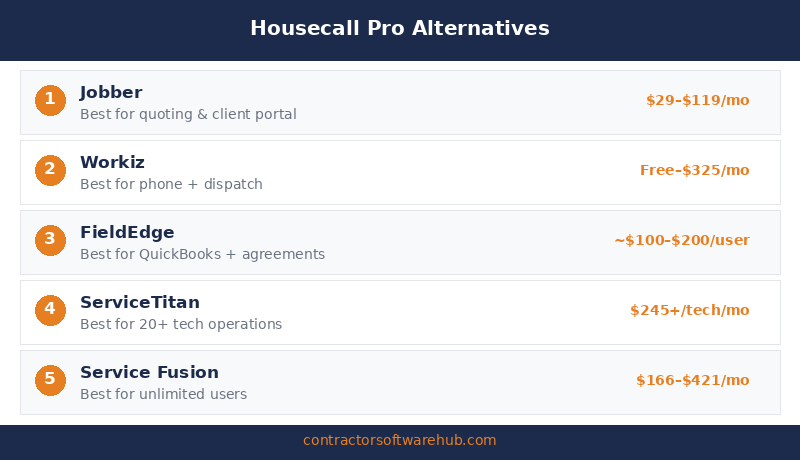
1. Jobber — Best for Smaller Crews Who Want Lower Entry Pricing
Jobber is the most direct HCP alternative for teams under 10 people. The entry price is half of what HCP charges, the interface is cleaner for operations-focused contractors, and the plan structure gives you more pricing steps as you grow.
Jobber Core starts at $29/month for a single user — $30/month less than HCP Basic. At 5 users, Jobber Connect Teams and HCP Essentials both land at $149/month. But Jobber’s Connect tier includes QuickBooks sync, automated reminders, and time tracking, while HCP Essentials adds GPS tracking and marketing automation. The feature sets overlap but prioritize different things.
Where Jobber pulls ahead on pricing is at 10+ users. Jobber Grow Teams covers 10 users at $299/month. Housecall Pro MAX covers 8 users at $299/month, so a 10-person team on HCP pays $369/month after adding 2 seats at $35 each. That’s $70/month more for two fewer included users.
What you give up switching from HCP to Jobber: Housecall Pro’s marketing automation is stronger. The automated review requests, email campaigns, and postcard marketing at the Essentials tier are genuinely better than Jobber’s equivalent tools, which mostly sit behind the Grow tier or paid add-ons. If Google reviews and repeat-customer marketing are your primary growth channel, that’s a real trade-off.
Best for: 1–10 person residential service crews that prioritize scheduling, quoting, and client communication over marketing automation. Especially strong for plumbing, HVAC, landscaping, cleaning, and electrical shops.
See our full Jobber vs. Housecall Pro comparison and Jobber review for the complete breakdown.
2. Service Fusion — Best for Teams That Need Unlimited Users
Service Fusion is the alternative that makes the most financial sense once your team passes 6–8 people. Every Service Fusion plan includes unlimited users at a flat monthly rate. No per-seat fees. No forced tier upgrades because you hired someone.
Service Fusion Starter runs $208/month on annual billing ($245/month monthly). That covers every user in your operation — dispatchers, office staff, field techs. Compare that directly to Housecall Pro at the same team size, and the math becomes clear:
The unlimited-user math at 8 users:
| Platform | Plan | Monthly Cost (8 Users) | Cost Per User | Annual Cost |
|---|---|---|---|---|
| Housecall Pro | Essentials + 3 add-on users | $149 + ($35 × 3) = $254/mo | $31.75 | $3,048 |
| Housecall Pro | MAX (8 users included) | $299/mo | $37.38 | $3,588 |
| Service Fusion | Starter (unlimited users) | $208/mo | $26.00 | $2,496 |
At 8 users, Service Fusion saves $46–$91/month over Housecall Pro depending on which HCP path you take. At 12 users, the gap widens: HCP MAX + 4 extra users = $439/month vs. Service Fusion still at $208/month — a $231/month difference, or $2,772/year.
What you give up: Service Fusion’s mobile app is weaker than HCP’s. The iOS/Android experience doesn’t have the same polish, and reviewers consistently note that desktop is the stronger interface. Marketing automation tools are minimal — no built-in postcard marketing, no automated review generation at HCP’s level. And there’s no free trial; you’re committing to at least a month before you can test the product with real workflows.
Best for: 8+ person service operations where per-user pricing is the primary cost concern. Strong fit for HVAC, plumbing, and electrical shops with dispatchers, office staff, and a growing field team.
3. Workiz — Best for Inventory-Heavy Service Businesses
Workiz fills a different gap than Jobber or Service Fusion. It’s strongest for service businesses that manage parts inventory, need integrated phone/SMS tools, and want AI-powered scheduling and call handling as the operation scales.
Workiz offers a free Lite plan for up to 2 users — genuinely useful for testing, though it caps at 20 jobs/month and lacks real reporting. The Kickstart plan runs $225/month ($187/month annual) for 3 users. Standard is $275/month ($229/month annual) for 5 users with QuickBooks integration and location tracking.
Pricing compared to HCP: for a 5-user team, Workiz Standard at $229/month (annual) is more expensive than HCP Essentials at $149/month. The value proposition is different — Workiz includes stronger inventory management and lead tracking tools, while HCP delivers better marketing automation and a more polished mobile experience.
The hidden cost with Workiz is add-ons. The phone system (~$100/month) and AI answering (~$200/month) are sold separately. A 5-person team on Workiz Standard with phone and AI could run $529+ per month — well above HCP Essentials. Budget the full stack, not just the base subscription.
What you give up: Workiz’s marketing tools are lighter than HCP’s. No postcard campaigns, limited email marketing, and the review automation isn’t as deeply integrated. The platform is newer and less established in contractor communities, which means fewer peer resources and integrations.
Best for: Locksmith, appliance repair, junk removal, and other service businesses that move parts and inventory. Teams of 3–10 that value phone system integration and AI scheduling over marketing automation.
4. FieldEdge — Best for HVAC-Specific Operations
FieldEdge is built specifically for HVAC, plumbing, and electrical contractors. Where HCP and Jobber are generalist field service platforms, FieldEdge goes deep on trade-specific workflows: flat-rate pricing books, service agreement management, and technician performance tracking designed for mechanical trades.
FieldEdge uses per-user pricing — approximately $100/month per office user and $125/month per field technician, based on reported pricing. A 5-tech team with 2 office staff runs roughly $825/month before add-ons. That’s significantly more expensive than HCP Essentials, and the onboarding process requires a 5-week implementation with setup fees.
The trade-off is depth. If your HVAC business depends on flat-rate pricing, service agreement revenue, and detailed technician performance metrics, FieldEdge offers workflows that Housecall Pro and Jobber don’t match. The pricebook integration alone can change how your techs present options in the field.
What you give up: Customer-facing tools (online booking, review automation, marketing) are weaker than HCP’s. The mobile app has a steeper learning curve. GPS tracking is an add-on, not built-in. And the higher per-user cost means this only makes financial sense if those HVAC-specific features drive real revenue impact. See our Housecall Pro vs. FieldEdge comparison for more detail.
Best for: HVAC and plumbing contractors doing $500K+ annually who build their business around flat-rate pricing and service agreements.
5. ServiceTitan — For Operations That Have Outgrown HCP Entirely
ServiceTitan is not a lateral move from Housecall Pro. It’s a tier above. This is enterprise field service software for large residential and commercial operations — 15+ technicians, dedicated office staff, multi-location complexity. It’s here because some contractors searching for HCP alternatives have genuinely outgrown what any mid-market platform can do.
ServiceTitan pricing is per-technician and not published publicly. Community-reported costs range from $245–$500 per technician per month, with implementation fees between $5,000 and $50,000 depending on company size. A 10-tech team can expect $30,000–$50,000+ in year-one costs.
What you get: enterprise-grade reporting, marketing attribution that tracks which campaigns produce actual booked jobs, integrated phone tracking, advanced dispatch optimization, and pricebook management that drives revenue per call. These are capabilities HCP doesn’t offer at any tier.
What you give up: simplicity, affordability, and fast setup. ServiceTitan implementations take weeks to months. The learning curve is steep. And the cost is only justifiable if your operation is large enough and your processes mature enough to leverage the full platform. For most 5–15 person teams, ServiceTitan is expensive overkill. See our Housecall Pro vs. ServiceTitan comparison and ServiceTitan review.
Best for: 15+ technician operations doing $2M+ annually with dedicated dispatchers, marketing staff, and the budget to invest in a 6–12 month implementation.
HCP Alternatives: Comparison Table
| Platform | Starting Price | 5-User Cost | User Model | Free Trial | Marketing Tools | QuickBooks Sync |
|---|---|---|---|---|---|---|
| Housecall Pro | $59/mo | $149/mo | Tiered (1/5/8) | 14 days | Strong | Essentials+ |
| Jobber | $29/mo | $149/mo | Tiered (1/5/10/15) | 14 days | Limited | Connect+ |
| Service Fusion | $208/mo | $208/mo | Unlimited | None | Minimal | All plans |
| Workiz | Free (Lite) | $229/mo | Tiered (2/3/5) | Free plan | Limited | Standard+ |
| FieldEdge | ~$225/mo* | ~$825/mo* | Per user | None | Minimal | All plans |
| ServiceTitan | ~$245/tech/mo | ~$1,225/mo | Per technician | None | Enterprise | All plans |
*FieldEdge pricing is quote-based. Estimates based on reported per-user rates of ~$100/mo (office) and ~$125/mo (field tech). All other prices reflect annual billing where available.
When Housecall Pro Still Wins
This section matters because switching platforms has real costs — data migration, team retraining, and lost productivity during the transition. If any of the following apply to your operation, Housecall Pro may still be the right call despite its pricing quirks.
Best-in-class marketing automation at mid-tier pricing. HCP’s review request automation, email campaigns, and postcard marketing at the Essentials level ($149/month) is genuinely the strongest in this category. Jobber doesn’t match it until Plus ($529/month) or paid add-ons. Service Fusion barely touches it. If your growth depends on Google reviews and repeat-customer marketing, HCP delivers more marketing value per dollar than any alternative on this list.
The mobile app is consistently strong. Both the iOS and Android apps rate well, and the customer-facing experience — “your tech is on the way” notifications, online booking, real-time tracking — is polished in a way that smaller competitors haven’t matched. Service Fusion’s mobile experience, by contrast, is a common complaint.
Brand recognition and ecosystem depth. HCP has a 30,000+ member Pro community, extensive training resources, and strong integrations with tools like QuickBooks. If you’re hiring techs who’ve used HCP before, onboarding is faster. If you’re evaluating based on peer recommendations in contractor communities, HCP comes up more often than most alternatives.
Simpler setup than enterprise tools. Compared to ServiceTitan’s months-long implementation or FieldEdge’s 5-week onboarding, HCP is ready to use within a day or two. For contractors who need to start running jobs through the platform immediately, that speed matters.
If HCP’s pricing works for your team size and the marketing tools align with your growth strategy, it remains a strong platform. Evaluate alternatives when the per-user math stops working — not just because a competitor’s headline price looks lower. See our full Housecall Pro review for the complete picture.
Bottom Line
The right HCP alternative depends on why you’re leaving. If it’s the entry price, Jobber gives you a $29/month starting point with a cleaner scaling path to 10 users. If it’s per-user costs as your team grows, Service Fusion‘s unlimited-user model at $208/month becomes the obvious move once you pass 6–8 people. If you need HVAC-specific workflows, FieldEdge goes deeper on trade tools. If you’ve genuinely outgrown mid-market software, ServiceTitan is the enterprise path — at enterprise prices.
Before you switch, use HCP’s 14-day free trial (or Jobber’s) to test the platform you’re considering with your real workflow. The features you lose in a switch — especially HCP’s marketing automation — may matter more than the pricing savings suggest. Compare the all-in cost, not just the headline number.
FAQ
What is the best alternative to Housecall Pro?
For most small residential service businesses, Jobber is the closest direct alternative. It matches HCP’s core features (scheduling, dispatching, invoicing, QuickBooks sync) at a lower solo entry price ($29/month vs. $59/month) and the same 5-user price ($149/month). For larger teams, Service Fusion‘s unlimited-user model at $208/month is the best value once you pass 6–8 users.
Is Jobber cheaper than Housecall Pro?
At the solo level, yes — Jobber Core is $29/month vs. HCP Basic at $59/month. At 5 users, they’re identical at $149/month. At 10 users, Jobber Grow Teams ($299/month) is cheaper than HCP MAX + 2 extra users ($369/month). The gap narrows at 15 users ($529 vs. $544). The pricing difference matters most at entry level and around the 8–12 user range.
Why are contractors switching away from Housecall Pro?
The four most common reasons: the forced jump from Basic ($59/month, 1 user) to Essentials ($149/month, 5 users) with no mid-tier option; per-user costs that stack up for teams beyond 8 people; add-on costs for Sales Proposals and Service Plans on lower tiers (~$80/month); and limited reporting outside the MAX plan. Price increases on existing customers are also a recurring complaint in recent reviews.
Is Service Fusion better than Housecall Pro?
For teams of 8+ people, Service Fusion’s unlimited-user pricing ($208/month) is significantly cheaper than Housecall Pro. At 12 users, HCP costs $439/month vs. Service Fusion’s $208 — a $231/month difference. However, Service Fusion’s mobile app is weaker, marketing automation tools are minimal, and there’s no free trial. HCP is the better platform for marketing-focused operations; Service Fusion wins on cost at scale.
Can I switch from Housecall Pro to Jobber easily?
Jobber offers data import tools for customer and job data, and the transition is generally smoother than switching to enterprise platforms like ServiceTitan. Budget 1–2 weeks for data migration, team training, and workflow setup. The biggest adjustment is losing HCP’s marketing automation features — automated review requests and postcard campaigns don’t have direct equivalents in Jobber without paid add-ons. Test Jobber’s 14-day free trial with your real data before committing to the switch.