
Disclosure: Some links on this page are affiliate links. If you sign up through one, I earn a small commission at no extra cost to you. My recommendations don’t change based on that.

Service Fusion Review (2026): Is It Worth It?
Unlimited-user flat-rate pricing is a genuine advantage for dispatch-heavy crews of 10+ — but the Android app is a dealbreaker for Android-majority teams, and there’s no free trial.
Service Fusion is worth looking at for HVAC, plumbing, and electrical crews of 10 or more people — but only if your techs are on iOS. The Android app sits at 2.7/5 on Google Play with 800+ reviews, and that is not a marginal problem. It is a documented, persistent operational liability for Android-majority teams.
The real draw here is pricing. Every plan includes unlimited users at a flat monthly rate. No per-user fees, no seat caps, no surprise overage charges as you add technicians. For a crew of 15, that math changes the economics of field service software significantly compared to platforms that charge per user.
Right for: Dispatch-heavy HVAC, plumbing, and electrical operations with 10–50 technicians who need unlimited user access, strong QuickBooks integration, and run iOS devices in the field.
Not for: Android-majority crews, solo operators or teams under 10 (Jobber is cheaper and simpler), anyone who wants a free trial before committing, or contractors who need offline capability in the field.
What Service Fusion Gets Right
The unlimited-user pricing model is the single biggest reason to consider Service Fusion. Every competitor in this range — Jobber, Housecall Pro, Workiz — charges per user or caps seats by tier. Service Fusion does not. Whether you have 5 users or 50, the price stays the same.
Here is what that means in practice. On Jobber Grow ($199/month), you get 15 users. Add a 16th and you are paying overages. On Service Fusion Starter ($208/month annual), you get unlimited users. For a 15-technician crew, the math is essentially identical — but Service Fusion gives you headroom to add dispatchers, office staff, and new hires without touching your bill.
At 20 or 30 users, the gap widens. Jobber would run $564–$854/month for that headcount. Service Fusion is still $208.
The dispatch board is built for operations that live on scheduling. Drag-and-drop job assignment, color-coded statuses, and a visual layout that dispatchers can actually work from without squinting. For shops running 10+ trucks daily, the dispatch board is the feature that gets the most daily use, and reviewers consistently call it out as one of Service Fusion’s operational strengths.
QuickBooks integration is genuinely strong. Two-way sync with both QuickBooks Online and Desktop — not just one-way invoice export. Customer records, payments, and job data stay connected between the field system and accounting. Multiple G2 and Capterra reviewers (4.1/5 on G2 from 119 reviews; 4.3/5 on Capterra from 290 reviews) cite the QuickBooks connection as a primary reason they chose Service Fusion over alternatives.
The iOS app works well. 4.6/5 on the App Store from 1,200+ reviews. Technicians on iPhones and iPads can access job details, capture signatures, process payments through FusionPay, and update work orders from the field. That is a meaningfully better field experience than what many mid-market platforms deliver.
On-site invoicing and payment processing close jobs faster. FusionPay lets techs collect payment in the field at 2.9% + $0.30 per transaction — standard industry rates. Invoices are created and sent from the job, not batched at end-of-day. For service businesses where getting paid on the same day as the work matters, this removes a real bottleneck.
Where Service Fusion Falls Short
The Android app is a genuine problem. 2.7/5 on Google Play from 800+ reviews. That is not a few unhappy users — it is a pattern. The most common complaints: crashes during job updates, photos failing to upload on anything less than strong LTE, slow loading times even on flagship devices, and significant battery drain during all-day use.
One Google Play reviewer put it bluntly: “This app is a hindrance to good efficient work. It has so many issues I can’t list them here — low operating speed on a brand new S24+, unreliable saving, and it can’t be used AT ALL if you don’t have service.”
Since the majority of field technicians use Android devices, this is not a minor detail. If your crew is mostly Android, Service Fusion is a risk you should not take without extensive testing — and Service Fusion does not offer a free trial to let you test it.
There is no free trial. This is unusual for the category. Jobber offers 14 days. Housecall Pro offers 14 days. Even Workiz has a permanently free Lite tier. Service Fusion asks you to commit at $245/month (or $208 annually) before your team has touched the software. Their explanation is that each account is customized during onboarding, but the result is the same: you are paying before you know whether it works for your crew.
Zero offline functionality. If a technician is in a basement, a mechanical room, a rural property, or any building with a weak cell signal, the app stops working. No queued actions, no cached job details, no offline data entry that syncs later. Techs in spotty-signal areas end up carrying paper forms as backup, which defeats the purpose of having field service software.
Reporting is basic. The built-in reports cover scheduling, revenue, and job status — the fundamentals. But contractors who want deeper business analytics, custom report building, or visual dashboards are going to export to Excel. Reports are also only available on desktop, not through the mobile app. For data-driven operations, this is a real limitation.
The Starter plan is not cheap for small crews. $245/month (or $208 annually) is a meaningful expense for a 3–5 person operation. The unlimited-user model only pays off once you have enough users to make per-user alternatives more expensive. For a crew under 10, Jobber at $39–$199/month covers similar workflows at a lower total cost and with a cleaner interface.
Pricing Breakdown
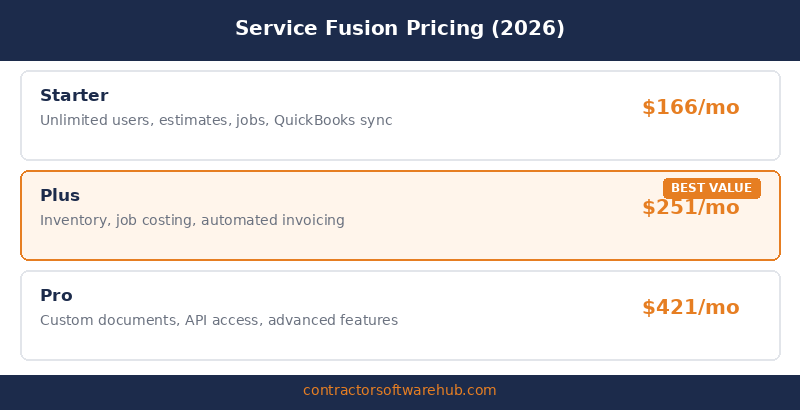
Service Fusion publishes its pricing at servicefusion.com/pricing. All plans include unlimited users. Annual billing saves 15%. There are no contracts — all plans are month-to-month unless you opt into annual billing for the discount.
| Plan | Monthly Price | Annual Price (per month) | What You Get |
|---|---|---|---|
| Starter | $245/mo | $208/mo | Scheduling, dispatch, CRM, estimates, invoicing, QuickBooks sync, payment processing, reporting, text alerts |
| Plus | $382/mo | $325/mo | Everything in Starter + job photo uploads, inventory management, job costing, integrated voice and text |
| Pro | $627/mo | $533/mo | Everything in Plus + customer web portal, Open API, eSign documents, custom documents, progress billing, recurring invoicing |
The base price is the starting point. Most teams add at least one or two extras:
| Add-On | Cost | Notes |
|---|---|---|
| GPS Fleet Tracking | $25–40/vehicle/mo | Plus hardware at ~$100–150/vehicle upfront |
| FusionPay Processing | 2.9% + $0.30/transaction | Standard rates; adds up on high-volume months |
| ServiceCall.ai (VoIP) | Custom pricing | AI-powered call features; priced separately |
| Implementation Fee | $199–$599 (one-time) | Varies by plan tier |
The math that matters: A 15-tech HVAC company on the Plus plan ($325/month annual) with GPS on 5 vehicles (~$150/month) lands around $475/month all-in. That is $31.67 per user per month. On Jobber, 15 users on the Grow plan would cost $199/month — but you are capped at 15, and adding a 16th user changes the math. Service Fusion’s per-user economics get better the larger your team gets.
For a 5-tech crew, the calculation flips. Service Fusion Starter at $208/month annual is $41.60 per user. Jobber Connect at $119/month for 5 users is $23.80 per user with a cleaner interface and a 14-day free trial. At this size, Jobber wins on value.
What Users Actually Say
Dispatch and scheduling get the most praise (G2 and Capterra reviewers). “Service Fusion makes dispatching and tracking our team real easy. It also allows us to make proposals in the field. We use Service Fusion multiple times a day and our technicians couldn’t be happier.” — Small business president, G2. The dispatch board and day-to-day scheduling workflow are consistently cited as the strongest operational feature.
QuickBooks integration is a recurring highlight (Capterra reviewers). “We like the perfect syncs with QuickBooks, a real plus.” — Verified Capterra review. Contractors who already run QuickBooks tend to frame the integration as a significant time-saver compared to platforms with weaker accounting connections.
The Android experience is consistently negative (Google Play reviewers). “I can always count on an unenjoyable experience when I use this app. Slow, buggy, annoying, and an unintuitive UI make this app an abominable nuisance to use.” — Google Play review. Another field technician: “If your phone based app is not developed, we will be looking at other options.” The Android complaints are not isolated incidents. They are a documented pattern across hundreds of reviews.
Pricing value draws mixed reactions depending on crew size (multiple sources). “One affordable price for all access as most companies charge per user price. Help desk is very responsive.” — General manager, G2. But a smaller operator on Capterra noted: “The price is fantastic. But you get what you pay for. Fairly simple to use, but not too many features to use anyway.” The value perception tracks directly with team size: larger crews love the unlimited model, smaller ones feel they are overpaying for capacity they do not use.
Support quality varies after onboarding (Capterra and GetApp reviewers). Onboarding gets consistent praise, but post-onboarding support is less predictable. One reviewer described waiting in a chat queue for 45 minutes during business hours. Another noted: “No longer after implementation have a rep to reach out to or contact. They will not call or check up after you are on boarded. Use the Help Desk only.” Several 2025–2026 reviews mention occasional system outages as a concern.
Bottom Line
Service Fusion’s unlimited-user pricing is a real differentiator if you have the team size to make it count. For operations with 10–50 technicians running iOS devices and already on QuickBooks, the combination of flat-rate pricing, a strong dispatch board, and tight accounting integration is a legitimate reason to put Service Fusion on the shortlist.
The honest catches are just as important. The Android app is rated 2.7/5 from 800+ reviews — that is not a fixable-next-quarter situation, it is a years-long pattern. There is no free trial, so you are committing dollars before testing. There is no offline mode, which is an operational problem for techs in basements, rural areas, or anywhere with a spotty signal. And for crews under 10, the pricing advantage disappears because cheaper alternatives like Jobber cover the same workflows at a lower per-user cost.
If Service Fusion is on your shortlist, compare it directly against our Jobber review for smaller crew value and Housecall Pro for marketing automation. Also worth reading: Best HVAC Software for Small Businesses and Best Scheduling Software for Contractors.
FAQ
Is Service Fusion worth it?
For HVAC, plumbing, or electrical crews with 10 or more technicians on iOS devices, Service Fusion can be worth it. The unlimited-user pricing at $208–$533/month means your cost per user drops significantly as your team grows — a 15-tech crew on the Starter plan pays roughly $14 per user per month. But for crews under 10, per-user platforms like Jobber are cheaper. And if your techs use Android, the 2.7/5 app rating is a serious concern to investigate before signing.
How much does Service Fusion cost?
Starter starts at $245/month ($208 with annual billing), Plus at $382/month ($325 annual), and Pro at $627/month ($533 annual). All plans include unlimited users. Add-ons like GPS fleet tracking ($25–40/vehicle/month) and FusionPay (2.9% + $0.30/transaction) are extra. There is also a one-time implementation fee ranging from $199 to $599 depending on the plan. No free trial and no free plan are available.
Does Service Fusion offer a free trial?
No. Service Fusion does not offer a free trial or a free plan. This is unusual in the field service software category, where 14-day trials are standard. Service Fusion customizes each account during onboarding, which they cite as the reason. In practice, it means you commit at $245+/month before your team can test the software in real field conditions.
Is the Service Fusion Android app any good?
No. The Android app is rated 2.7/5 on Google Play from 800+ reviews as of early 2026. Common complaints include crashes during job updates, failed photo uploads, slow loading on flagship devices, heavy battery drain, and complete failure without a cell signal. The iOS app, by contrast, is rated 4.6/5. If your technicians are primarily on Android, this is a significant risk factor.
How does Service Fusion compare to Jobber?
Service Fusion wins on pricing for larger crews — unlimited users at a flat rate versus Jobber’s per-user pricing. For a 15-tech crew, Service Fusion Starter ($208/month annual) and Jobber Grow ($199/month for 15 users) are nearly identical in cost, but Service Fusion lets you add more users without paying more. Jobber wins for small crews (under 10) with lower starting prices, a cleaner interface, a 14-day free trial, and stronger mobile apps on both platforms. See our full Jobber review for a deeper comparison.